 MEDIVEERSETHE PRACTICAL HUB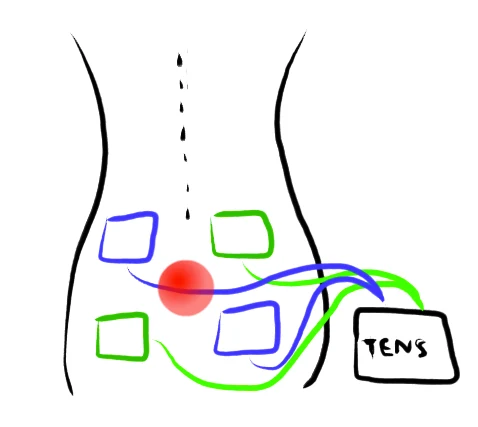
Control unit: located on the reference instrument. Compare its shape and position with the apparatus used in your practical.
Zoom in, then drag to inspect. Keyboard: + / − to zoom, arrows to pan, 0 to reset. Tap the numbered markers to explore parts.
TENS surface stimulation — schematic illustration
Image: Michaelj0505 · Source / original · CC BY-SA 3.0Resized and converted to WebP; original colours retained.
TENS electrical stimulator
Transcutaneous electrical nerve stimulation · surface stimulation
What is its use?
Illustrates a clinical application of peripheral-nerve stimulation; TENS is used for temporary pain relief in appropriate settings.
Tap a number to locate its part. Zoom, drag or use full screen to inspect the reference. Models and graduations can differ; check the actual apparatus used in your laboratory.
How to recognise it.
- Portable electronic control unit
- Lead wires connect the unit to skin electrodes
- Electrode pads provide the surface interface
TENS is a clinical surface-stimulation device. It is not interchangeable with an isolated laboratory pulse stimulator or an ECG recorder.
Point them out.
Choose a part to bring its numbered marker into view.
The science behind the reading.
Controlled pulsed electrical stimulation is delivered through surface electrodes. Waveform and control settings depend on the device.
Think first. Then reveal.
Explain your answer aloud before opening it.
01What does TENS stand for?+
Transcutaneous electrical nerve stimulation.
02Does it record a nerve signal?+
No. It delivers stimulation; recording electrical activity requires a separate recording system.
03What do the electrode pads do?+
They form the interface through which the device delivers its electrical stimulation at the skin surface.
04Is every stimulator suitable for every person or experiment?+
No. Intended use, electrical safety and clinical suitability depend on the device and situation. Follow the approved teaching or clinical protocol.
Read the references.
Teaching and clinical references are listed here. Image attribution and licence appear below the viewer.